Top Google Search Parameters Developers Should Know
Learn the most important Google Search parameters developers should know, including query, country, language, location, device, search type, pagination, time range, SafeSearch, site filters, file type, and result fields for SERP APIs, SEO tools, AI agents, and RAG workflows.
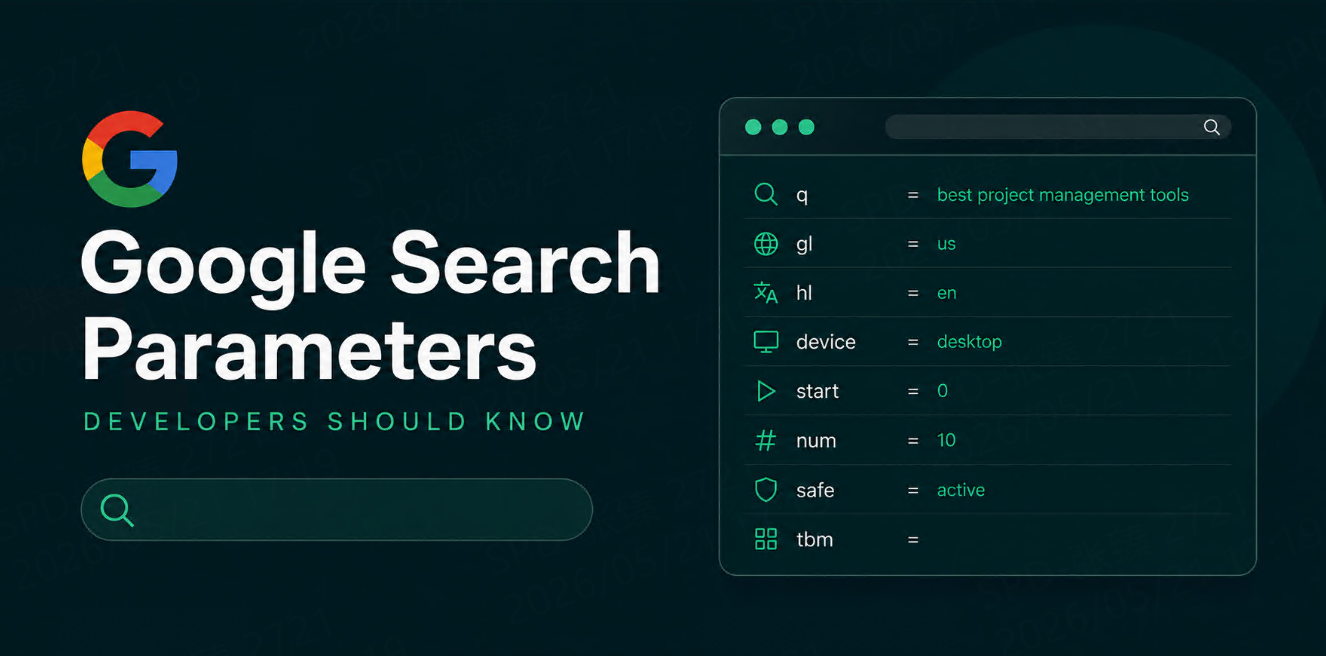



If you are building a search tool, SERP tracking system, SEO dashboard, AI agent, RAG workflow, or market monitoring pipeline, Google Search parameters matter.
The same keyword can return different results depending on country, language, device, location, search type, page, time range, and filtering settings.
For developers, this means one thing:
A search query is not just a keyword.
It is a full search context.
A practical search request usually looks like this:
{
  "query": "best project management software",
  "country": "us",
  "language": "en",
  "device": "desktop",
  "location": "United States",
  "search_type": "web",
  "page": 1,
  "num_results": 10
}
This guide explains the most important Google Search parameter concepts developers should know, how they affect results, and how to use them in search APIs, SEO tools, AI agents, and automation workflows.
A Quick Note on Parameter Names
Different systems use different names.
Google’s own Custom Search JSON API uses parameters such as q, gl, hl, lr, num, start, safe, dateRestrict, fileType, siteSearch, and searchType. Google’s documentation says query parameters can be used to specify settings such as country, date restrictions, file type, and language.
SERP API providers and workflow tools may expose more readable names such as:
{
  "query": "keyword",
  "country": "us",
  "language": "en",
  "device": "mobile",
  "search_type": "news"
}
So this article focuses on the parameter concepts developers need to understand, not only one exact syntax.
The syntax changes by provider. The logic does not.
1. Query Parameter
The query parameter is the search term itself.
Common names include:
| Parameter Name | Common Meaning |
q | Query in Google-style APIs |
query | Query in many SERP APIs |
keyword | Query in SEO tracking tools |
Example:
{
  "q": "best CRM software for startups"
}
The query controls the intent of the search.
Small changes can produce very different results.
| Query | Likely Intent |
crm software | Broad product research |
best CRM software | Comparison intent |
best CRM software for startups | Specific commercial intent |
ExampleBrand CRM pricing | Brand and pricing intent |
CRM software alternatives | Competitor comparison intent |
For developers, always store the exact query used.
Do not normalize it too aggressively. best running shoes and best running shoes for flat feet are not the same query, despite the spreadsheet’s desperate wish for order.
2. Country Parameter
Country affects which results appear.
A query searched in the United States may return different domains, rankings, snippets, and SERP features from the same query searched in the United Kingdom, Germany, or Japan.
Common parameter names include:
| Parameter Name | Common Meaning |
gl | Country or geolocation signal in Google-style parameters |
country | Target country in many SERP APIs |
market | Market setting in some platforms |
Example:
{
  "query": "best electric scooter",
  "country": "de"
}
Google’s Custom Search documentation describes gl as the geolocation of the end user and says the value is a two-letter country code that can boost results whose country of origin matches the parameter.
Use country parameters when building:
| Use Case | Why Country Matters |
| International SEO | Rankings differ by country |
| Market research | Competitors vary by region |
| Ecommerce monitoring | Sellers and prices vary by market |
| Localized AI agents | Answers need regional context |
| Brand monitoring | Brand visibility may differ by country |
For search workflows, country should be stored with every result.
Without country, ranking data loses context.
3. Language Parameter
Language affects result presentation and sometimes result selection.
Common parameter names include:
| Parameter Name | Common Meaning |
hl | Interface language |
lr | Restrict results by document language |
language | Language setting in many APIs |
Example:
{
  "query": "project management software",
  "country": "fr",
  "language": "fr"
}
Google’s documentation describes hl as setting the user interface language and lr as restricting search to documents written in a particular language.
This distinction matters.
| Parameter Concept | What It Does |
| Interface language | Changes labels, UI text, and localized presentation |
| Result language restriction | Tries to limit returned documents to a language |
| Query language | The language used in the search phrase itself |
Example:
| Query | Country | Language | Expected Result Context |
best hotels in Paris | us | en | English results for US users |
meilleurs hôtels à Paris | fr | fr | French results for French users |
パリ ホテル おすすめ | jp | ja | Japanese results for Japanese users |
For multilingual search systems, store both query language and result language.
Yes, this is annoying. So is reality.
4. Location Parameter
Country is broad. Location is more precise.
Location parameters are important for local SEO, Maps results, local business data, and city-level search monitoring.
Common parameter names include:
| Parameter Name | Common Meaning |
location | City, region, or named location |
uule | Encoded Google location parameter used in some systems |
lat / lng | Coordinate-based location |
geo | Geographic search context |
Example:
{
  "query": "dentist near me",
  "country": "us",
  "location": "Austin, Texas, United States"
}
Location matters for queries such as:
dentist near mecoffee shopbest gym in Austinemergency plumber Chicagorestaurants nearbylocal SEO agency
Useful location levels include:
| Location Level | Example |
| Country | United States |
| State or region | California |
| City | Austin |
| Neighborhood | Downtown Austin |
| Postal code | 10001 |
| Coordinates | Latitude and longitude |
For local search, country alone is usually not enough.
A search for coffee shop in New York and a search for coffee shop in Austin are not the same search. Astonishing, but cities exist.
5. Device Parameter
Google results can differ between desktop and mobile.
This matters for SEO tracking, local search, ecommerce, and SERP layout analysis.
Common values include:
| Device | Use Case |
desktop | Standard desktop SERP tracking |
mobile | Mobile ranking and layout tracking |
tablet | Less common, but useful in some workflows |
Example:
{
  "query": "best meal delivery service",
  "country": "us",
  "language": "en",
  "device": "mobile"
}
Device can affect:
| Result Element | Why It Matters |
| Ranking order | URLs may rank differently |
| SERP features | Mobile layouts may show different modules |
| Local results | Mobile may emphasize local intent |
| Snippets | Visible text may be shorter |
| Ads | Ad layout may differ |
| Click behavior | Mobile users interact differently |
For rank tracking, always separate desktop and mobile results.
Mixing them makes reporting look simpler and less true, which is a classic trade in human dashboards.
6. Search Type Parameter
Not all Google searches return standard web results.
Developers often need different search verticals.
Common search types include:
| Search Type | Typical Use |
| Web | Standard organic results |
| News | News monitoring |
| Images | Visual search and image SEO |
| Videos | Video content monitoring |
| Shopping | Product and price research |
| Maps | Local business data |
| Jobs | Job market tracking |
| Scholar | Academic research workflows |
Example:
{
  "query": "wireless headphones",
  "search_type": "shopping",
  "country": "us",
  "language": "en"
}
Google’s Custom Search JSON API uses searchType=image for custom image search; if unspecified, results are limited to webpages.
In SERP APIs, search type is often exposed as something more readable, such as:
{
  "engine": "google_images",
  "q": "modern desk lamp"
}
or:
{
  "search_type": "images",
  "query": "modern desk lamp"
}
Search type should be explicit.
If your workflow expects product prices, do not accidentally collect standard web results and then wonder why the data looks useless. The machine did what you asked. Tragic.
7. Pagination Parameters
Pagination controls which result page you collect.
Common parameter names include:
| Parameter Name | Common Meaning |
start | Index of the first result to return |
page | Page number |
num | Number of results to return |
num_results | Result count in many APIs |
Example:
{
  "query": "best SEO tools",
  "country": "us",
  "language": "en",
  "page": 1,
  "num_results": 10
}
Google’s Custom Search JSON API documents num as the number of search results to return, with valid values from 1 to 10, and start as the index of the first result to return. The same docs note that start=11 would begin at the second page when the default page size is 10.
Pagination is useful for:
| Use Case | Why Pagination Matters |
| Top 10 tracking | First page only |
| Top 100 tracking | Multiple pages |
| Competitor discovery | Deeper result collection |
| Source discovery | More candidate URLs |
| AI research workflows | Broader source pool |
For most SEO workflows, start with top 10 or top 20.
More results are not automatically better. They are often just more ways to pay for noise.
8. Time Range Parameter
Time range controls freshness.
This is useful for news monitoring, recent content discovery, market research, trend tracking, and AI agents that need current sources.
Common parameter concepts include:
| Parameter Concept | Example |
| Past day | Results from the last day |
| Past week | Results from the last week |
| Past month | Results from the last month |
| Past year | Results from the last year |
| Custom date range | Start date and end date |
Google’s Custom Search JSON API includes dateRestrict, with supported values such as d[number], w[number], m[number], and y[number] for days, weeks, months, and years.
Example:
{
  "query": "AI regulation updates",
  "country": "us",
  "language": "en",
  "time_range": "past_week"
}
Use time range parameters for:
| Workflow | Recommended Freshness |
| News monitoring | Past day or week |
| Market updates | Past week or month |
| SEO content research | Past month or year |
| Competitor launches | Past week or month |
| RAG source discovery | Depends on user question |
Store the time range with the result.
A result from the past day and a result from the past year answer different questions.
9. SafeSearch Parameter
SafeSearch controls filtering for explicit content.
Common parameter names include:
| Parameter Name | Common Meaning |
safe | SafeSearch setting |
safe_search | SafeSearch setting in many APIs |
Google’s Custom Search JSON API describes safe as the search safety level, with values including active to enable SafeSearch filtering and off to disable it.
Example:
{
  "query": "fashion photography ideas",
  "country": "us",
  "language": "en",
  "safe": "active"
}
SafeSearch matters for:
| Use Case | Why It Matters |
| Public apps | Reduce risky content |
| Education tools | Safer search results |
| Brand dashboards | Avoid unexpected explicit results |
| Image search | Important for visual workflows |
| AI agents | Prevent unsafe context from entering prompts |
For production applications, do not leave SafeSearch behavior undefined.
Undefined defaults are how surprises get promoted to incidents.
10. Site and Domain Parameters
Developers often need to include or exclude specific domains.
Common approaches include:
| Method | Example |
| Site search | Search within a domain |
| Exclude domain | Remove a domain from results |
| Domain filter after collection | Keep or remove domains in your code |
Google’s Custom Search JSON API includes siteSearch for specifying a site to include or exclude, with siteSearchFilter controlling whether that site is included or excluded.
Example:
{
  "query": "pricing",
  "site": "example.com"
}
Useful workflows include:
| Workflow | Example |
| Own site monitoring | Track your own pages |
| Competitor analysis | Search competitor domains |
| Documentation search | Search docs only |
| Source filtering | Remove low-quality domains |
| Brand monitoring | Track pages mentioning a brand |
For SERP data workflows, you can also collect general results first, then filter domains after collection.
That approach is usually more flexible.
11. Exact Match and Exclusion Parameters
Sometimes the query alone is too broad.
Exact match and exclusion parameters help narrow results.
Common concepts include:
| Parameter Concept | Use |
| Exact terms | Require a phrase |
| Excluded terms | Remove results containing terms |
| Additional required terms | Add required context |
| OR terms | Allow multiple alternatives |
Google’s Custom Search API includes parameters such as exactTerms, excludeTerms, hq, and orTerms for these kinds of query constraints.
Example:
{
  "query": "project management software",
  "exact_terms": "remote teams",
  "exclude_terms": "free template"
}
Use these carefully.
Over-filtering can remove useful results.
Under-filtering can flood the workflow with irrelevant pages.
The ideal setting is boring, precise, and useful. A rare triumph.
12. File Type Parameter
File type filtering helps developers find PDFs, documents, spreadsheets, presentations, or other indexed file types.
Common parameter names include:
| Parameter Name | Common Meaning |
fileType | File extension filter |
file_type | File type filter in many APIs |
Google’s Custom Search documentation describes fileType as restricting results to files of a specified extension.
Example:
{
  "query": "2026 retail market report",
  "file_type": "pdf"
}
Useful workflows include:
| Workflow | Useful File Type |
| Market research | |
| Academic research | |
| Government documents | |
| Data collection | CSV or XLSX |
| Presentation discovery | PPT or PDF |
File type filters are useful for research agents and RAG pipelines because reports and official documents often live as downloadable files.
13. Duplicate Filtering Parameter
Duplicate filtering affects whether similar results are collapsed or shown.
Google’s Custom Search documentation describes filter as controlling the duplicate content filter, with values for turning it on or off.
Example:
{
  "query": "AI customer support tools",
  "filter": "1"
}
For most user-facing search workflows, filtering duplicates is useful.
For monitoring workflows, turning duplicate filtering off may sometimes reveal repeated or similar pages.
| Workflow | Suggested Approach |
| User-facing search | Keep duplicate filtering on |
| SEO monitoring | Usually keep it on |
| Content duplication research | Consider turning it off |
| Source discovery | Test both if needed |
Duplicate handling should be a deliberate choice, not an accident.
14. Result Fields to Store
Strictly speaking, result fields are not search parameters.
But developers should define them at the same time.
A clean search result record should include:
| Field | Why It Matters |
| query | Reproduce the search |
| country | Search market context |
| language | Result language context |
| location | Local search context |
| device | Desktop or mobile context |
| search_type | Web, news, image, shopping, etc. |
| page | Pagination context |
| position | Ranking position |
| title | SERP title |
| url | Source URL |
| domain | Source domain |
| snippet | Search preview |
| collected_at | Snapshot time |
Example:
{
  "query": "best CRM software",
  "country": "us",
  "language": "en",
  "device": "desktop",
  "search_type": "web",
  "position": 3,
  "title": "Best CRM Software for Small Businesses",
  "url": "https://www.example.com/best-crm-software",
  "domain": "example.com",
  "snippet": "Compare CRM platforms by pricing, features, and use cases.",
  "collected_at": "2026-07-15T09:00:00Z"
}
Search parameters explain how the result was collected.
Result fields explain what was found.
You need both.
Common Parameter Sets by Use Case
SEO Rank Tracking
{
  "query": "best SEO reporting tools",
  "country": "us",
  "language": "en",
  "device": "desktop",
  "search_type": "web",
  "page": 1,
  "num_results": 10
}
Local SEO Monitoring
{
  "query": "dentist near me",
  "country": "us",
  "language": "en",
  "location": "Austin, Texas, United States",
  "device": "mobile",
  "search_type": "web"
}
News Monitoring
{
  "query": "AI regulation updates",
  "country": "us",
  "language": "en",
  "search_type": "news",
  "time_range": "past_week"
}
Google Images Research
{
  "query": "modern desk lamp",
  "country": "us",
  "language": "en",
  "search_type": "images",
  "safe": "active"
}
Shopping and Price Research
{
  "query": "wireless headphones",
  "country": "us",
  "language": "en",
  "search_type": "shopping",
  "device": "desktop"
}
RAG Source Discovery
{
  "query": "2026 smart home market report",
  "country": "us",
  "language": "en",
  "search_type": "web",
  "time_range": "past_year",
  "file_type": "pdf"
}
How TalorData Helps Developers Work with Search Parameters
TalorData can act as a structured SERP data layer for developer workflows.
Instead of manually constructing fragile Google Search URLs, parsing search result pages, and maintaining selectors, developers can use TalorData to send search requests with clear parameters and receive structured results. Start testing SERP API for free now>>
A typical workflow looks like this:
Search parameters
↓
TalorData SERP API
↓
Structured Google Search results
↓
Database, SEO dashboard, AI agent, RAG workflow, or automation tool
TalorData can support parameter-driven workflows such as:
| Workflow | Useful Parameters |
| SEO monitoring | query, country, language, device, page |
| Local SEO | query, country, location, device |
| Image research | query, country, language, search type |
| Shopping tracking | query, country, language, search type |
| News monitoring | query, country, language, time range |
| RAG source discovery | query, file type, time range, language |
| AI agents | query, country, language, result count |
The main value is consistency.
Search parameters become structured inputs.
Search results become structured outputs.
Developers can then store, compare, filter, alert, and build AI workflows without manually wrestling a search page like it owes them money.
Final Thoughts
Google Search parameters are not small technical details.
They define the search context.
For developers, the most important parameters are:
query
country
language
location
device
search_type
page
num_results
time_range
safe
site/domain filters
exact/exclude terms
file_type
duplicate filtering
A good search workflow does not just ask:
What keyword did we search?
It asks:
What keyword did we search, in which country, language, location, device, search type, page, and time range?
That is the difference between random search output and usable SERP data.
FAQ
What is the most important Google Search parameter?
The query parameter is the most important because it defines the search intent. But for developer workflows, query alone is not enough. Country, language, device, location, search type, and collection time are also important.
What is the difference between country and location?
Country sets a broad market context. Location is more precise and can target a city, region, postal code, neighborhood, or coordinates.
Why does device matter in Google Search results?
Desktop and mobile search results can differ in rankings, layout, snippets, ads, and SERP features. Developers should store device context with each result.
Should developers store search parameters with every result?
Yes. Search parameters explain how the result was collected. Without them, historical comparison and debugging become unreliable.
Are Google Search parameter names the same across all APIs?
No. Google-style parameters, SERP APIs, workflow tools, and SDKs may use different names. Developers should understand the underlying concept and map it to the provider’s syntax.